Most Docker build advice stops at layer order: copy dependency manifests first, run the package manager, then copy the rest of the source. That is useful, but it is not enough for a release tool. A release tool has to answer harder questions. Which process was allowed to read the source tree? Which credentials reached the builder? Was the Docker socket exposed to an untrusted command? Did the cache come from a previous branch, a shared bucket, or an empty local builder? Can an agent explain why a build was fast without scraping BuildKit logs?
Torque treats image builds as part of the delivery proof, not a side effect before Helm. The build can run through BuildKit, write capture evidence, scan for secret leaks, generate SBOM and provenance, use local or S3 cache, and optionally re-exec inside an nsjail sandbox. That makes the build path inspectable in the same way the apply path is inspectable.

The builder is the trust boundary
There are several ways to build a container image on a workstation or build host. The easiest path is a local Docker daemon. The more controllable path is BuildKit through a configured builder address. The most isolated production path is usually a remote BuildKit daemon or a Docker Buildx container builder with credentials attached to that daemon, not passed through every CLI call.
Torque exposes that topology directly. --builder selects a BuildKit address, --authfile points at a Docker config.json, --platform controls multi-arch output, and --push or --load decides where the result goes. The important design rule is that Docker credentials should have the smallest possible scope. A build that only pulls from a private base image should not inherit the whole developer home directory. Use --authfile or a narrow sandbox bind instead of --sandbox-bind-home unless you are debugging a local-only setup.
torque build . \
  --file Dockerfile \
  --tag ghcr.io/acme/api:dev \
  --builder docker-container://buildx_buildkit_torque0 \
  --authfile ./tmp/docker-config.json \
  --platform linux/amd64 \
  --push
Sandbox mode is not just one flag
--sandbox means the build must run inside the configured sandbox or fail. That is different from "try sandbox if available." For security-sensitive builds, fail closed is the right behavior. Torque also exposes the parts operators need when a real host is messy: --sandbox-config, --sandbox-bin, --sandbox-bind, --sandbox-workdir, --sandbox-probe-path, and --sandbox-logs.
The repo includes two useful profile shapes. sandbox/linux-ci.cfg is compatible with CI-style Linux builders and uses larger tmpfs limits. sandbox/linux-strict.cfg enables a tighter namespace profile, drops capabilities, avoids sysfs, and keeps only the compatibility mounts a Docker or BuildKit workload usually needs. The strict profile is the one to start from when you are reducing host exposure. The CI profile is the one to use when user namespaces or cgroup namespaces are not available on the build host.
export TORQUE_SANDBOX_CONFIG="$(pwd)/sandbox/linux-strict.cfg"
torque build . \
  --tag ghcr.io/acme/api:secure \
  --sandbox \
  --sandbox-logs \
  --sandbox-probe-path /var/run/docker.sock \
  --authfile ./tmp/docker-config.json
torque build sandbox doctor is the fast path for diagnosing that boundary before you waste time on a full build. It checks whether the sandbox runtime can start and whether the selected context behaves the way Torque expects. Use it after changing nsjail, Docker socket mounts, CI runners, or user namespace settings.
torque build sandbox doctor --context .
torque build . --sandbox --sandbox-config sandbox/linux-ci.cfg --sandbox-logs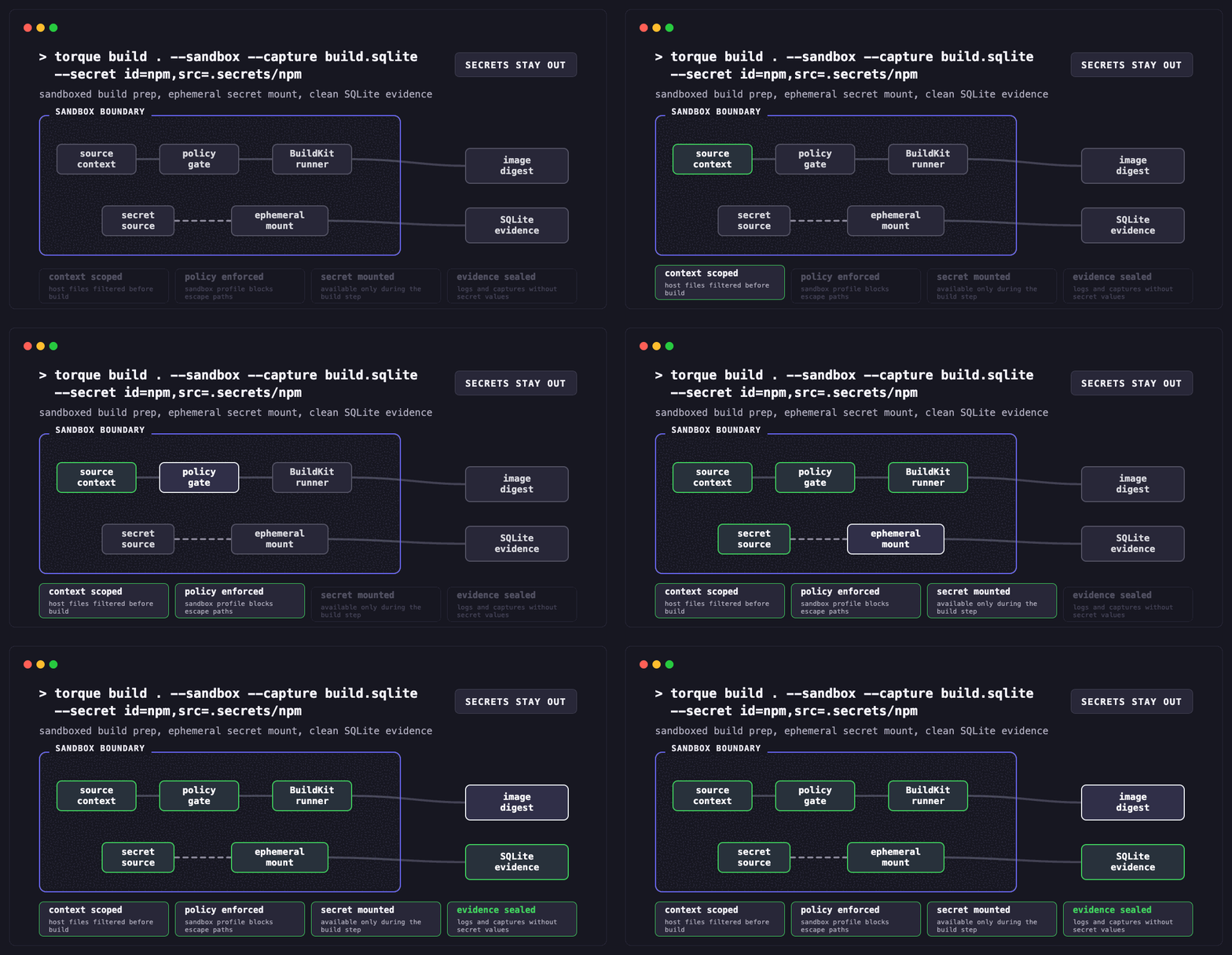
Secret leaks are a build failure mode
Sandboxing limits what the build process can touch. Secret-leak detection checks what the build tries to carry forward. Torque's --secrets guardrail has three modes: warn, block, and off. The default is warn, which keeps local iteration moving while still writing findings. Release builds should usually use block so secret-like values in Dockerfiles, build args, copied files, logs, cache metadata, or generated evidence stop the build before the image is published.
torque build . \
  --tag ghcr.io/acme/api:release \
  --sandbox \
  --secrets block \
  --secrets-config security/secrets-rules.yaml \
  --secrets-report dist/torque-secrets-report.json \
  --capture dist/build.sqlite \
  --push
--secrets-config points at the rule config for project-specific patterns and allowlists. --secrets-report writes a machine-readable report that can be attached to proof evidence. For repository setup, torque init --secrets-provider vault --secrets-file ./secrets.dev.yaml keeps secret references explicit without teaching Dockerfiles or agents the raw values.
Cache is a correctness feature
A fast cache that nobody trusts gets turned off. A trusted cache needs names, scope, and evidence. Torque accepts raw BuildKit cache specs with --cache-from and --cache-to, and it also provides first-class S3 flags for the common shared-cache case: --s3-cache, --s3-cache-region, --s3-cache-name, --s3-cache-mode, --s3-cache-endpoint-url, and --s3-cache-path-style.
mode=min exports enough metadata for final image reuse. mode=max exports a deeper graph and is usually better for CI fleets where branches rebuild related layers. The cache name matters. If every branch writes the same manifest name, you get more reuse but more risk of noisy invalidation. If every commit writes a unique name, you get cleaner provenance but fewer hits. A practical default is one cache prefix per repo and one manifest name per service or mainline branch.
torque build . \
  --tag ghcr.io/acme/api:dev \
  --s3-cache s3://acme-build-cache/torque/main \
  --s3-cache-region us-east-1 \
  --s3-cache-name api-main \
  --s3-cache-mode max
S3 credentials should belong to the BuildKit daemon, instance role, web identity role, or disposable builder container. Do not place AWS keys in build args, Dockerfile ENV, or chat-visible agent instructions. Torque carries the cache reference and region; the underlying builder should own credential resolution.
Agents need cache tools, not log scraping
Humans can read a BuildKit log and infer that go mod download was rebuilt because go.sum changed. Agents should not have to guess. Torque's MCP cache tools split the job into explicit read and write operations. torque.cache.inspect normalizes cache configuration. torque.cache.plan classifies changed paths and returns warm targets. torque.cache.warm performs the mutating cache export only when that is allowed.
printf '{"jsonrpc":"2.0","id":1,"method":"tools/call","params":{"name":"torque.cache.plan","arguments":{"contextDir":".","dockerfile":"Dockerfile","tags":["ghcr.io/acme/api:dev"],"changedPaths":["go.mod","go.sum"],"s3Cache":"s3://acme-build-cache/torque/main","s3CacheRegion":"us-east-1","s3CacheName":"api-main"}}}\n' |
  torque-mcp --stdio
This is the difference between automation and a shell transcript. The agent receives structured cache state, changed-path impact, and the exact warm target to request. A reviewer can see whether the agent only inspected the cache or actually wrote to it.
Dockerfile shape still matters
Torque does not make a bad Dockerfile good. It makes cache behavior observable enough that you can fix it. Keep the build context small with .dockerignore. Copy dependency manifests before the full source tree. Use BuildKit secret mounts for credentials instead of ARG or ENV. Pin base images by digest when using hermetic mode. Avoid writing package-manager caches into final runtime layers. Split toolchain stages from runtime stages so dependency churn does not invalidate the image users actually run.
# syntax=docker/dockerfile:1.7
FROM golang:1.25@sha256:... AS build
WORKDIR /src
COPY go.mod go.sum ./
RUN --mount=type=cache,target=/go/pkg/mod go mod download
COPY . .
RUN --mount=type=cache,target=/root/.cache/go-build go build -o /out/api ./cmd/api

FROM gcr.io/distroless/base-debian12@sha256:...
COPY --from=build /out/api /api
USER 65532:65532
ENTRYPOINT ["/api"]
Hermetic and sandbox are different controls
--sandbox controls where the build client process runs on the host. --hermetic controls what the build is allowed to depend on. A sandbox can still talk to the network if the profile allows it. A hermetic build can still be run outside a sandbox if you choose that. Use both when the release needs a strong story: sandbox to reduce host exposure, hermetic mode to require pinned bases and restrict network dependency unless --allow-network is explicitly present.
torque build . \
  --secure \
  --tag ghcr.io/acme/api:release \
  --attest-dir dist/attest \
  --capture dist/build.sqlite \
  --s3-cache s3://acme-build-cache/torque/main \
--s3-cache-region us-east-1--no-cache rarely
It is useful for proving a clean rebuild, but it also hides Dockerfile structure problems. Prefer a cache matrix that changes one input at a time.
Use BuildKit secret mounts and Torque secret scanning. A changed secret should not become a layer digest, cache key, or proof artifact.
Use branch or service-specific S3 cache names. Let CI write shared caches; let pull requests import them unless policy allows export.
--capture, SBOM, provenance, and proof graph links turn a fast build into a release artifact someone can audit later.
A practical release build recipe
The production path should be boring: diagnose sandbox, inspect cache, build with evidence, then attach the result to the release proof. The command below intentionally keeps credentials outside the Dockerfile and cache reference, writes attestations, captures the build stream, and fails if the sandbox cannot run.
torque build sandbox doctor --context .

torque build . \
  --file Dockerfile \
  --tag ghcr.io/acme/api:v1.2.3 \
  --platform linux/amd64 \
  --sandbox \
  --sandbox-config sandbox/linux-strict.cfg \
  --authfile ./tmp/docker-config.json \
  --s3-cache s3://acme-build-cache/torque/main \
  --s3-cache-region us-east-1 \
  --s3-cache-name api-main \
  --s3-cache-mode max \
  --sbom --provenance \
  --attest-dir dist/attest \
  --capture dist/build.sqlite \
  --push
The reason this matters is not just speed or security in isolation. It is operational memory. Six months later, you should be able to answer why a build had a cache miss, which builder wrote the cache, which sandbox profile was active, which digest was produced, and which release consumed it. Torque's build path is designed so that answer is in the artifacts, not trapped in a terminal scrollback.